


TDAC Thailand Digital Arrival Card 2026: Complete Guide to Thailand Entry Requirements
Quick Answer: What Is the TDAC?
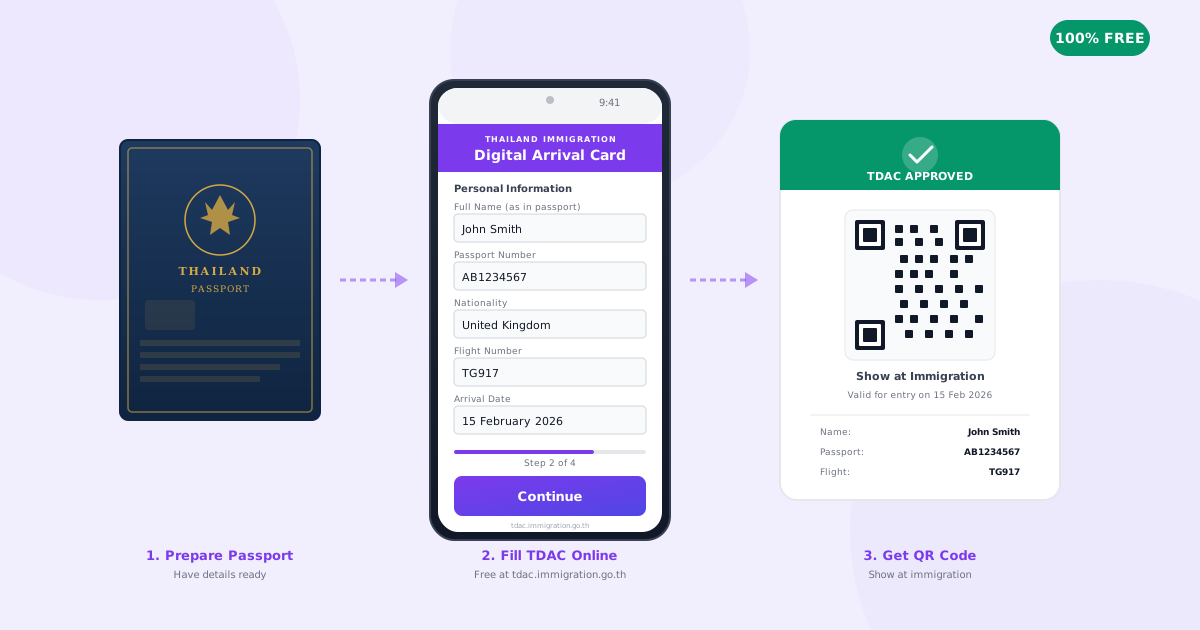
The TDAC (Thailand Digital Arrival Card) is a mandatory, free online form that all non-Thai nationals must complete within 72 hours before entering Thailand. It replaced the paper TM6 card on 1 May 2025. Submit it at tdac.immigration.go.th — takes 3-5 minutes. No app exists. Any site charging a fee is a scam.
- Cost: Free — always (any site charging you is unauthorized)
- Time: 3-5 minutes to complete
- When: Within 72 hours before your arrival date
- Who: All non-Thai nationals, including children
- Replaced: The old paper TM6 arrival/departure card
- Mandatory since: 1 May 2025
“The Thailand Digital Arrival Card (TDAC) is free, mandatory, and takes 5 minutes. Complete it at tdac.immigration.go.th before you fly. There is no app — website only.”
— Gareth Scott, SabaiFly
TDAC Key Facts
Official Website
tdac.immigration.go.th
Cost
Free (always)
Time to Complete
3-5 minutes
Submit Window
72 hours before arrival
Mandatory Since
1 May 2025
Replaces
Paper TM6 card
Who Needs It
All non-Thai nationals
Mobile App
None — website only
Best Browser
Chrome or Safari
What Is the TDAC (Thailand Digital Arrival Card)?
The TDAC (Thailand Digital Arrival Card) is a mandatory online form created by the Thailand Immigration Bureau that all non-Thai nationals must complete before entering Thailand. It officially launched on 1 May 2025 and replaced the old paper TM6 arrival/departure card that travellers had been filling out on flights for decades.
The system was introduced to strengthen border security, streamline immigration procedures, support public health management through integrated health declarations, and provide a seamless, paperless entry experience for international visitors.
The TDAC applies to all modes of entry — whether you are arriving by air, land, or sea. It is submitted online at the official portal tdac.immigration.go.th and is completely free of charge.
Who Needs to Complete the TDAC?
All non-Thai nationals entering Thailand must complete the TDAC, with very few exceptions. This includes:
- Tourists — visa-exempt and visa on arrival travellers
- Business travellers — all visa categories
- Students — on education visas
- Retirees and expats — re-entering on valid visas or re-entry permits
- Digital nomads — including DTV (Destination Thailand Visa) holders
- LTR (Long-Term Resident) visa holders
- Children and infants — each child needs their own TDAC (parent/guardian submits)
- Non-Thai diplomatic passport holders — confirmed by the Immigration Bureau FAQ
Important: Every individual needs their own TDAC — including babies. A family of four needs four separate TDAC submissions.
The TDAC Is NOT a Visa
This is a critical distinction that confuses many travellers. The TDAC is an additional entry requirement — it does not replace or substitute for a visa. You must complete the TDAC regardless of your visa status:
- If you are visa-exempt (e.g., UK, US, EU citizens getting 60 days) — you still need the TDAC
- If you are using visa on arrival — you still need the TDAC
- If you have a pre-approved visa (tourist, business, retirement, education) — you still need the TDAC
“Think of the TDAC as the digital replacement for the paper card you used to fill out on the plane — it captures your travel details for immigration records, not your visa status.”
— Gareth Scott
When to Submit Your TDAC
Submit within 72 hours (3 days) before your arrival date — the earlier the better.
- The system opens submissions 72 hours before your stated arrival date
- The form takes approximately 3-5 minutes to complete
- You can submit earlier, but the TDAC may remain in a pending state until the 72-hour window
- Do not wait until you arrive — airport kiosks have queue times of 30-60+ minutes during peak periods
- Progress cannot be saved — you must complete the form in one session
Insider tip: Complete your TDAC as soon as you have your flight booked and accommodation confirmed. Set a reminder for 3 days before departure. I always do mine the moment I get my booking confirmation.
What You Need Before Starting
Have these ready before you begin — the form cannot be saved mid-way:
| Document / Information | What You Need |
|---|---|
| Passport | Full name, passport number, issue date, expiry date (6+ months validity recommended) |
| Flight Details | Flight number and arrival date (the date you land in Thailand) |
| Accommodation | Name and address of your first hotel, Airbnb, or rental property |
| Travel History | Countries visited in the last 14 days |
| Email Address | Working email to receive your TDAC confirmation and QR code |
| Device | Desktop or tablet recommended (better than mobile for dropdown menus) |
Step-by-Step: How to Complete the TDAC
Follow these seven steps to complete your Thailand Digital Arrival Card in under 5 minutes.
Visit the Official TDAC Portal
Go to tdac.immigration.go.th and click the "Arrival Card" button. This is the only official website — never use third-party sites.
Enter Your Passport Information
Choose one of two methods: (a) Upload a clear photo of your passport data page — the system reads the MRZ (Machine Readable Zone) automatically, or (b) manually enter your details in English. If uploading, always verify the extracted data — OCR misreads are common (especially 0 vs O).
Provide Your Travel Itinerary
Enter your flight number, expected arrival date in Thailand, country of departure, and list any countries visited in the past 14 days. Use the date your plane lands, not your departure date — watch for overnight flights crossing time zones.
Enter Your Accommodation Details
Provide the name and address of your first place of stay. You only need one address, not every hotel. For hotels: hotel name and city (e.g., "Grand Hyatt Erawan, Bangkok"). For Airbnb: full address with unit number, street, and sub-district.
Complete the Health Declaration
Answer the health status questions as required by the Thai Ministry of Public Health. If you have travelled to countries on Thailand's health watchlist, additional questions may appear (e.g., Yellow Fever vaccination proof).
Review, Enter Your Email, and Submit
Preview all entered information carefully. Click "Edit" to correct any mistakes. Enter your email address (this is where you receive the confirmation and QR code). Tick the terms and conditions box, then click Submit.
Save Your QR Code Immediately
Download the PDF with your QR code from the confirmation screen. You will also receive it via email within minutes. Screenshot the QR code on your phone as a backup, and optionally print a hard copy. You will need this at immigration.
TDAC done in 5 minutes. Now book the flight.
Search 100+ airlines for the cheapest fares to Thailand — direct and connecting flights compared instantly.
Find Cheap Flights to ThailandQR Code & the Immigration Process
Here is what actually happens when you arrive in Thailand with your completed TDAC — based on first-hand experience at Suvarnabhumi:
- Have three things ready as you approach immigration: passport (open to photo page), boarding pass, and your TDAC QR code (on phone screen or printed).
- Join the standard immigration queue for foreign passport holders. In practice, there are no separate "express" lanes for TDAC — everyone queues the same way.
- The officer may or may not ask for your QR code. In many cases, the data is already linked electronically to your passport number. Some officers scan the QR code, others simply process your passport without asking for it.
- The officer cross-references your TDAC data against your passport and travel documents. Inconsistencies can trigger extended questioning or delays.
From experience: Always have your QR code ready on your phone screen regardless. Even if the officer doesn't ask, being prepared avoids any hold-ups. The system appears to be integrated electronically in most cases.
Got Your TDAC Sorted? Now Find Your Flight
Compare cheap flights to Bangkok, Phuket, Chiang Mai and 50+ Thai destinations.
Search Flights to ThailandCommon Mistakes to Avoid
These are the most frequent errors travellers make when completing the TDAC:
Date Format Confusion
The TDAC uses DD/MM/YYYY format. North Americans accustomed to MM/DD/YYYY frequently enter dates incorrectly, causing form errors or mismatched arrival dates.
Passport Number Typos
Confusing the letter "O" with the number "0" is extremely common. Double-check every character. If using passport photo upload, verify the OCR extraction carefully.
Wrong Arrival Date
Enter the date your plane lands in Thailand, not your departure date. For overnight flights, these are different days. A London evening departure arrives in Bangkok the next day.
Name Mismatches
Your name must match your passport exactly, including middle names if they appear in the MRZ. Do not use nicknames, shortened names, or married names that differ from the passport.
Navigating Away Mid-Form
The TDAC does not save progress. If you navigate away, close the tab, or lose your connection, you must start over from the beginning.
Using the Wrong Browser
The portal works best on Google Chrome or Safari. Firefox may have display issues. Mobile works but dropdown menus can be difficult on small screens — use a tablet or desktop if possible.
TDAC Scam Warning: Do NOT Pay for Your Arrival Card
WARNING: The TDAC Is 100% Free
Multiple third-party websites and mobile apps charge fees of $5-25 for TDAC submission. These are all unauthorized. The official TDAC portal operated by the Thailand Immigration Bureau is completely free.
- The only official URL is tdac.immigration.go.th
- There is no official TDAC mobile app
- Never enter your passport details on any site other than the official portal
- Report scam sites to the Thailand Immigration Bureau at tdac@immigration.go.th
Who Is Exempt from the TDAC?
Very few categories of travellers are exempt:
| Category | TDAC Required? |
|---|---|
| Thai nationals | No — fully exempt |
| Airline/vessel crew members | No — exempt |
| Transit passengers (staying in international zone) | No — if not passing immigration |
| Non-Thai diplomatic passport holders | Yes — required |
| Children and infants | Yes — each child needs their own |
| Long-term visa holders / expats re-entering | Yes — new TDAC for every entry |
Can You Edit Your TDAC After Submitting?
Partially — the rules are important to understand:
Can Be Updated
- Flight number
- Arrival date
- Accommodation details
- Travel history
Use the "Update Arrival Card" function on the portal.
Cannot Be Edited
- Full name
- Passport number
- Nationality
- Date of birth
If wrong, submit a brand new TDAC. The system uses the most recent valid submission.
Airport Kiosks (Fallback Option)
If you arrive in Thailand without completing the TDAC online, self-service kiosks are available at five airports:
- Suvarnabhumi Airport (BKK) — Bangkok's main international airport
- Don Mueang Airport (DMK) — Bangkok's secondary/budget airline airport
- Phuket Airport (HKT)
- Chiang Mai Airport (CNX)
- Hat Yai Airport (HDY)
Warning: Expect 30-60+ minute delays at kiosk queues during peak arrival times. This is before you even join the passport control queue. Always complete your TDAC online before departure.
Pre-Travel TDAC Checklist
Use this checklist to ensure you're fully prepared before submitting your TDAC:
Passport with 6+ months validity from arrival date
Flight booking confirmation with flight number
First accommodation name and full address
Arrival date confirmed (date you land, not depart)
Countries visited in last 14 days listed
Working email address (you receive QR code here)
Use Chrome or Safari browser on desktop/tablet
Complete TDAC at tdac.immigration.go.th (FREE)
Save QR code — screenshot + email + optional print
Have QR code accessible on phone at immigration
TDAC vs ETA vs Thailand Visa — What's the Difference?
| System | What It Is | Status (2026) |
|---|---|---|
| TDAC | Digital arrival/departure card (immigration form) | Active & mandatory since May 2025 |
| ETA | Electronic Travel Authorization (pre-screening, similar to US ESTA) | Delayed — deprioritised in favour of TDAC |
| Visa | Permission to enter and stay for a specific period/purpose | Active — separate from TDAC |
| TM6 | Old paper arrival/departure card filled out on flights | Discontinued — replaced by TDAC |
Key point: The 60-day visa exemption for 93 eligible countries (permanently extended from 30 days in late 2024) is a visa policy. The TDAC is an immigration form. Both apply simultaneously — they are not alternatives to each other.
Official Government Links
Use only these official sources for TDAC information and submission:
- Official TDAC Portal: tdac.immigration.go.th
- TDAC User Manual (English): tdac.immigration.go.th/manual/en/
- TDAC FAQ Page: tdac.immigration.go.th/manual/en/faq.html
- Thailand Immigration Bureau: immigration.go.th
- Tourism Authority of Thailand: tourismthailand.org
- TDAC Support Email: tdac@immigration.go.th
Frequently Asked Questions About the TDAC
What is the TDAC (Thailand Digital Arrival Card)?
The TDAC is a mandatory online form that replaced the old paper TM6 arrival/departure card. All non-Thai nationals must complete it before entering Thailand, regardless of visa type. It is submitted free of charge at the official website tdac.immigration.go.th.
Is the TDAC free or do I have to pay?
The TDAC is completely free. There is no fee whatsoever. Any third-party website charging a fee (typically $5-25) for TDAC submission is unauthorized and should be avoided. The only official website is tdac.immigration.go.th.
When should I fill out the TDAC before my trip?
You can submit the TDAC within 72 hours (3 days) before your arrival date. The form takes approximately 3-5 minutes to complete. Submit as early as possible within the window — do not wait until arrival, as airport kiosk queues can take 30-60+ minutes.
What information do I need for the TDAC?
You need: your passport (number, issue/expiry dates), flight number and arrival date, name and address of your first accommodation in Thailand, countries visited in the last 14 days, and a working email address to receive your QR code confirmation.
Do Thai nationals need to fill out the TDAC?
No. Thai nationals are fully exempt from the TDAC. It is required only for non-Thai nationals entering Thailand.
What happens if I don't fill out the TDAC before arriving?
You can use self-service kiosks at Suvarnabhumi, Don Mueang, Phuket, Chiang Mai, or Hat Yai airports. However, expect significant delays of 30-60+ minutes before even reaching the passport control queue.
Can I edit my TDAC after submitting it?
Partially. You can update flight number, accommodation, and arrival date. However, your name, passport number, nationality, and date of birth cannot be edited. If these are wrong, submit a completely new TDAC — the system uses the most recent valid submission.
Is the TDAC the same as a Thailand visa?
No. The TDAC is NOT a visa. It is an additional entry requirement that must be completed regardless of your visa status — whether visa-exempt, using visa on arrival, or holding a pre-approved visa.
Do children and babies need their own TDAC?
Yes. Every individual requires their own TDAC, including children and infants. Parents or guardians can complete the form on behalf of minors.
Is there an official TDAC mobile app?
No. There is no official TDAC mobile app. The only authorized method is the official website at tdac.immigration.go.th, which works in mobile browsers. Any app claiming to be official is unauthorized.
Ready to Visit Thailand?
You've got the TDAC covered. Now find the best flight deals to Bangkok, Phuket, Chiang Mai, Krabi, and more.
Search Cheap Flights to ThailandCite This Article
Scott, G. (2026). “TDAC Thailand Digital Arrival Card 2026: Complete Guide to Thailand Entry Requirements.” SabaiFly. Retrieved from https://www.sabaifly.com/en/blog/tdac-thailand-digital-arrival-card

Gareth Scott
· Founder, SabaiFlyFounder of SabaiFly. First visited Thailand at 19 and has been returning ever since. Father of four children of Thai-English heritage. Speaks Thai proficiently.
Read full bio →